Order picking app for webshops
Order picking software on the phones you already have
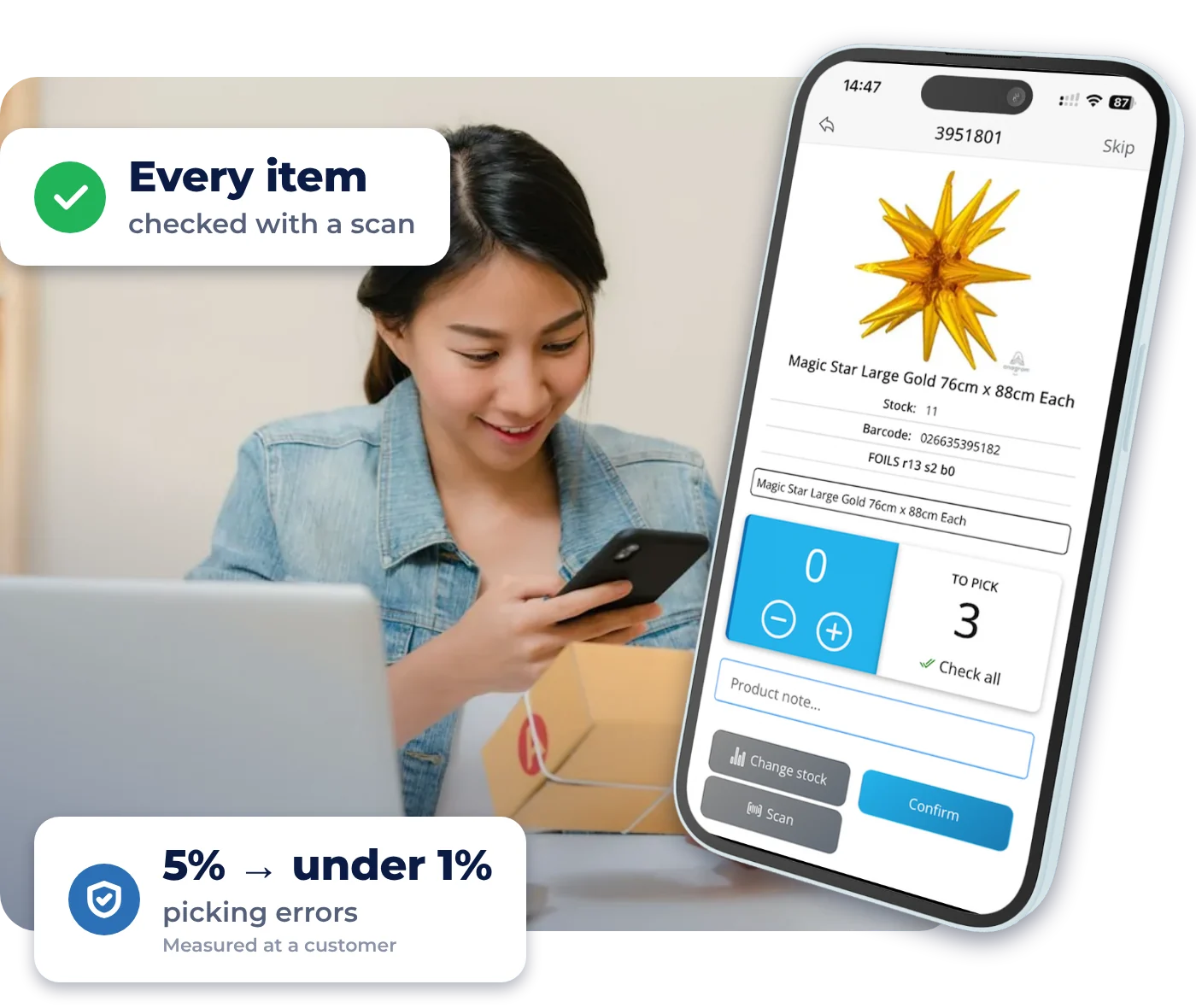
Orderpicking App is order picking software for webshops that ship their own orders. Orders, photos and stock appear on your team’s phones. Pickers see each item’s location and quantity and check it with a barcode scan, and the order status goes back to your webshop.
- 3x faster than picking with a paper packing slip
- No paper and no extra hardware needed
- No credit card, no automatic subscription
30 days free with Inventory and POS · Ends on its own · Help with installation from the founders
-

 Android and iOS
- Adapts to any existing workflow
- From €14.95 a month
- 16 platforms and your own system
What does a wrong item cost your webshop?
A wrong item means a return, a second shipment and a customer who doubts you. Paper pick lists leave that to chance. Orderpicking App checks every item before it goes in the box.
Fewer wrong items
A barcode check and a product photo for every item. The app flags anything that doesn’t match the order.
3x faster than paper
Picking is 3x faster than with a paper packing slip. No more paper: a pick route through your own locations shows pickers where to go next.
The whole team can help
Location, quantity and photo are on screen, so temporary staff can start quickly in busy periods.
A warehouse picking app and pick and pack software in one
How does order picking work in the app? Real screens, from the first order to the packed box.
 Count correct
Pick
Every item checked with a scan
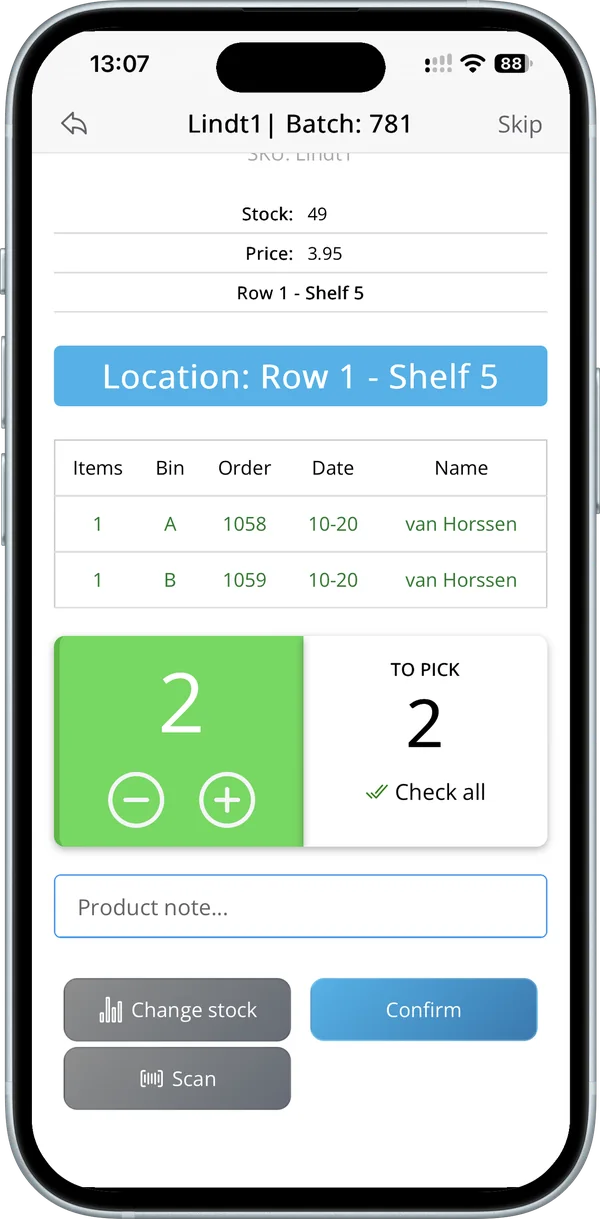
For each item, pickers see the location, photo and quantity. They scan the barcode with the phone camera or a Bluetooth scanner, or count with plus and minus.
- Camera or Bluetooth scanner
- A note per product
- Correct stock on the spot
 One bin per order
Batch
Several orders in one round
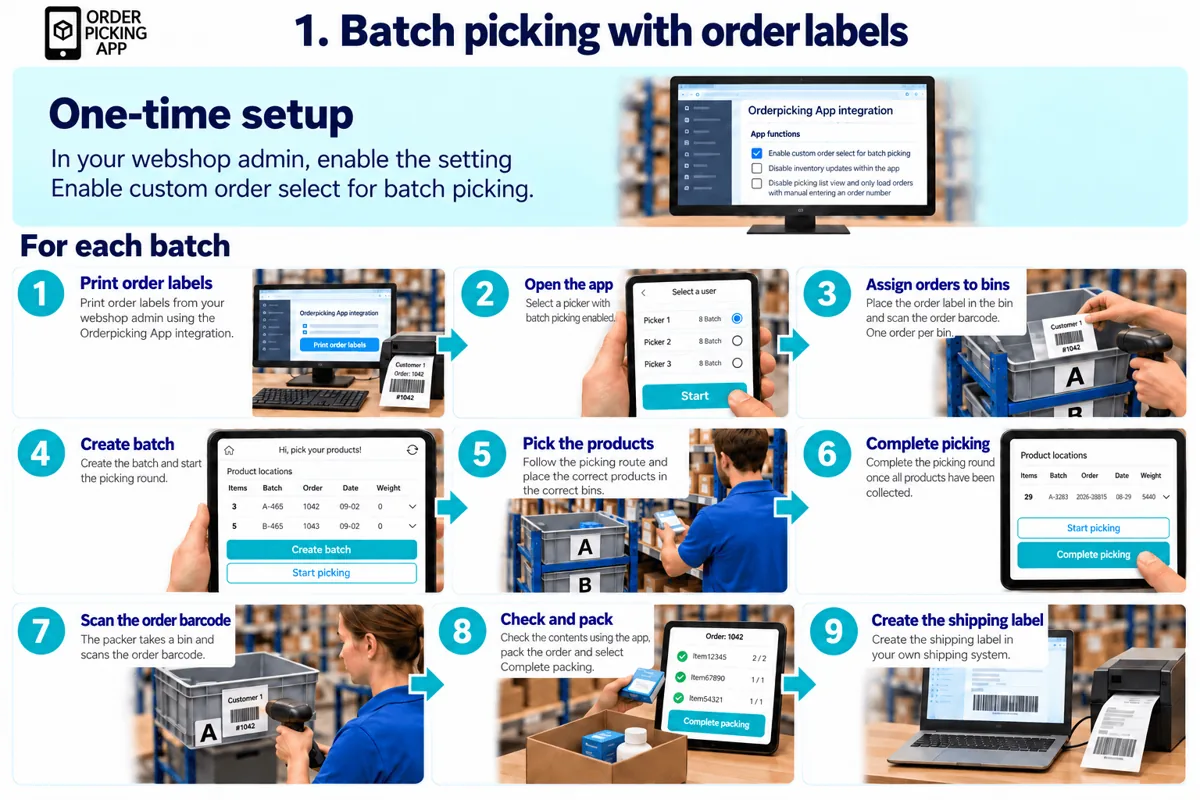
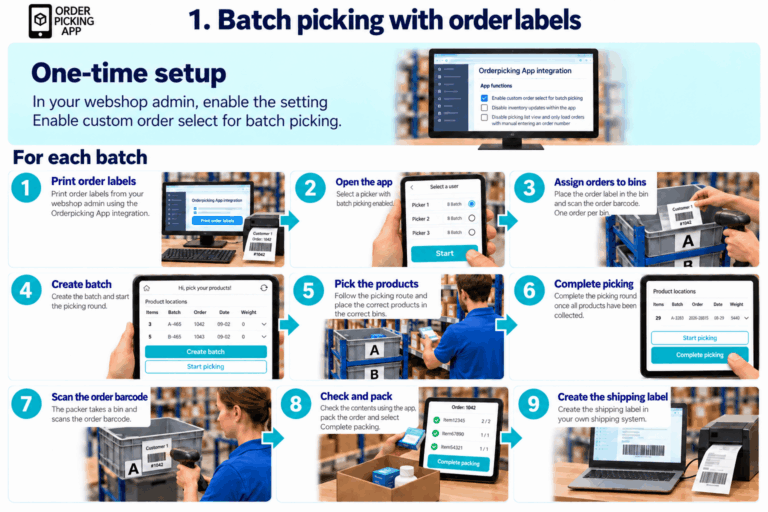
Batch picking is faster still than single order picking: 2 to 20 orders in one round, each in its own bin. The app shows per product how many go into which bin, and you choose from four ways to build a batch.
- One bin per order
- Four ways to build a batch
- Less walking back and forth
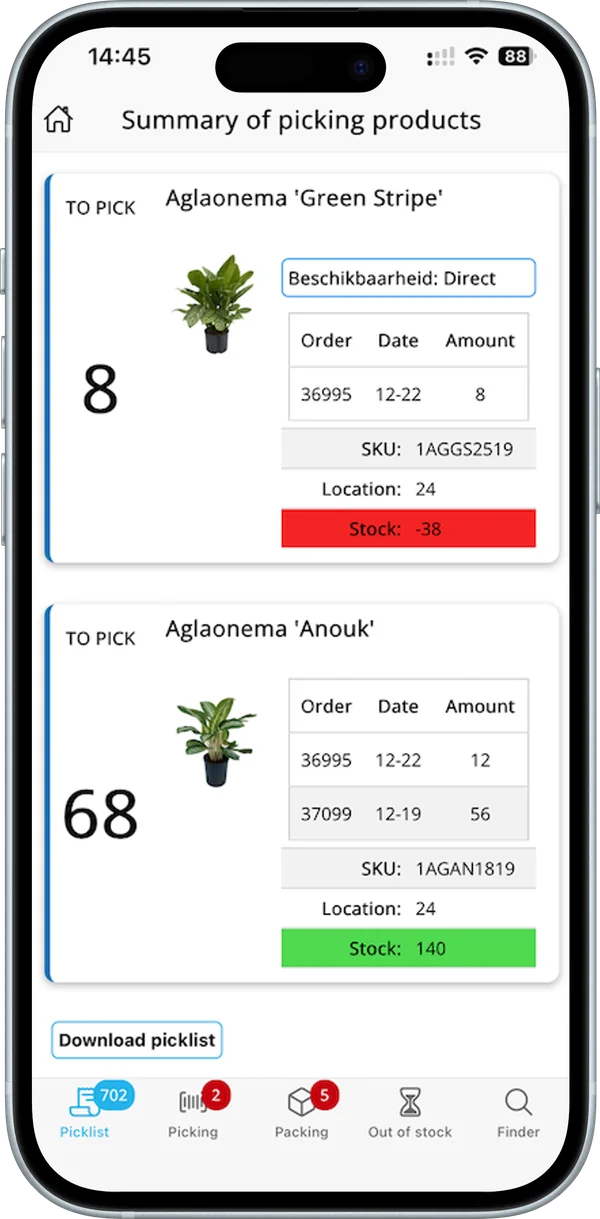 Stock at a glance
Plan
See what to pick and what’s missing
The summary adds up what each product needs across your open orders. When stock falls short, it turns red, so you know what to reorder.
- Totals per product
- Stock shown in green or red
- Download the pick list
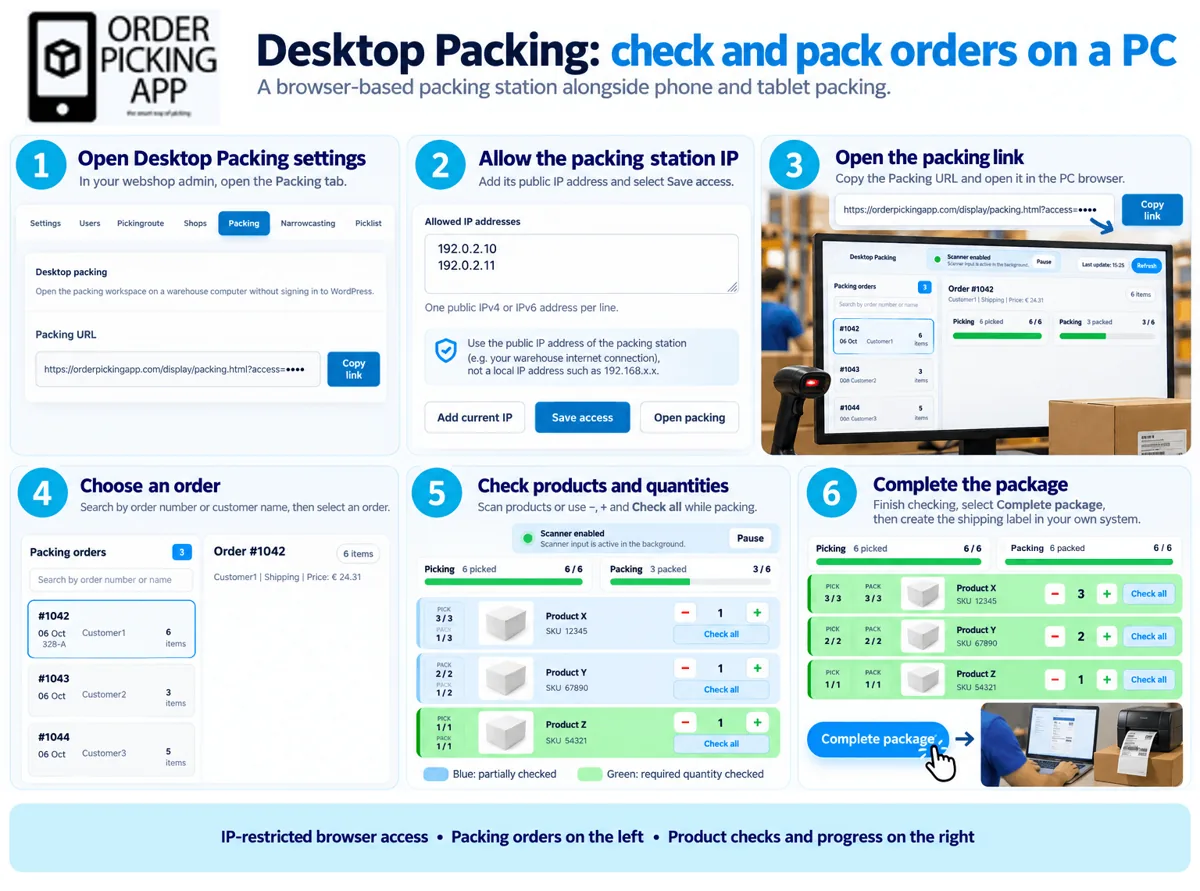 Works on a PC too
Pack
A last check before the box closes
At packing you see what was picked and what goes in the box, on a phone or at a PC with Desktop Packing. The order status then goes back to your webshop.
- Check per product and quantity
- On a phone, tablet or PC
Measured at VLM Hydrocultuur
About 20 minutes faster per order and picking errors down from 5% to under 1% in the first four months of use. How much you save depends on your warehouse and order mix.

What webshops say about Orderpicking App
Good barcode scanning capability
The barcode scanning capability … has nearly eliminated picking errors, ensuring our customers receive exactly what they ordered, every time.
 K’OOK!, cooking store in the Netherlands Review on WordPress.org, March 2024
It’s been a gamechanger!
The owner was extremely helpful with setting up the app from the back end to work with our needs and has been very open to hearing feedback on how to improve the app.
Excellent plugin and amazing customer service
During the 30-day trial, the customer service was honestly amazing! Niels was super helpful — he went above and beyond to help me sort out my inventory and fix a few setup issues.
Average from the Shopify App Store, Wix App Market, WordPress.org and BigCommerce App Marketplace, checked in October 2026.
Which webshop platforms does it connect with?
WooCommerce, Shopify, BigCommerce, Wix, Magento, PrestaShop, Ecwid, EKM, IdoSell, ShopWired, SureCart, Etsy, CCV Shop, Mijnwebwinkel, Selro and Exact Online, and your own system through a JSON feed.















Start small: from sign-up to picking in three steps
-
Start your trial
Enter your details and choose your platform. No credit card needed. Your account details arrive by email.
-
Connect your webshop
Install the plugin or app for your platform, or link it with an API key. Orders come in instantly.
-
Pick your first order
Download the app, scan the API key and begin with single order picking. Move to batches when your team is ready.
Everything your stockroom needs
Every picking and packing feature, in one app on the phones you already have.
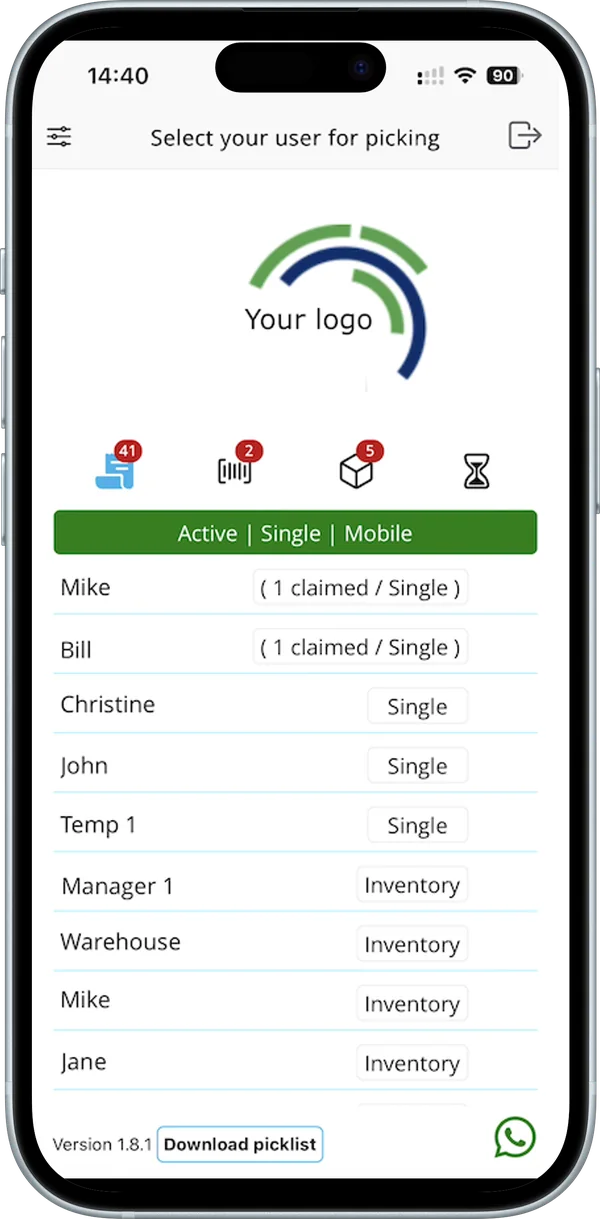
Your team and your logo in the app
Add your pickers, upload your logo and see who is working on what.
Single and batch picking
One order at a time, or several at once into bins A, B, C on your cart.
Your own pick route
Sort by category, SKU, barcode or your own stock locations.
Barcode checks
Scan with the phone camera or a Bluetooth scanner.
Backorders in view
Products you can’t pick turn red and appear in a separate list, so you know what to order.
Several pickers
Install the app on every phone and see who picked what.
Desktop packing
Turn any PC into a packing station that checks every product and quantity.
See it in action
Short videos, all under two minutes.
-
0:54
Orderpicking App explained
What the app does for your webshop, in under a minute.
-
1:38
Single order picking
One order at a time: choose a picker, scan, count and pack.
-
1:47
Batch from your oldest orders
The app fills a batch with 2 to 20 of your oldest open orders.
-
1:29
Desktop packing
Find an order at your packing station, check the items and complete it.
Orderpicking App at a glance
What it is, what it works with and what it costs.
Checked: November 2026 · Plans & pricing · All integrations
- What it is
- A picking and packing app for webshops that ship their own orders. Not a full warehouse system or a fulfilment service.
- How much faster
- 3x faster than picking with a paper packing slip. Batch picking is faster still than single order picking.
- Your workflow
- Adapts to any existing workflow, with settings for users, order flow, what the app shows and extra functions. No paper needed.
- What is imported
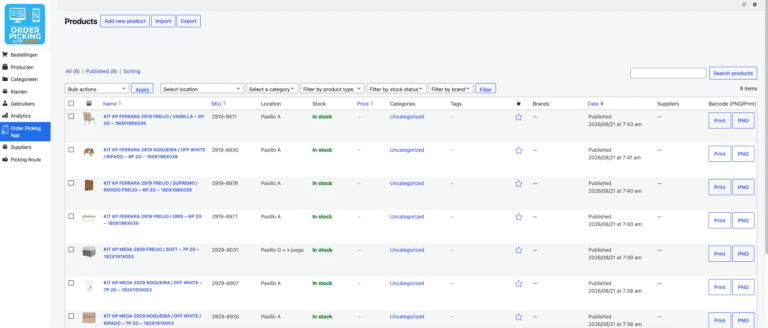
- Orders and product data, including product photo and stock.
- How fast
- Instant: new orders appear in the app straight away.
- Order status
- The order status is written back to your webshop.
- Devices
- iPhone and iPad with iOS 17 or newer, and Android phones and tablets with Android 11 or newer, including Zebra scanners. A Bluetooth scanner is optional.
- Trial
- 30 days free on the Medium + Inventory + POS plan (up to 600 orders a month). No credit card, and it doesn’t turn into a paid subscription automatically.
- Price
- From €14.95 a month (Small, up to 300 orders a month). With the Inventory or POS add-on from €54.95 a month.
- Made by
- Arture B.V. in the Netherlands.

Artjan and Niels
Who you work with
Built and supported by the founders
We’re Artjan and Niels, two Dutch founders who saw how much time online retailers lose picking and packing orders. We help you with the installation ourselves, and you keep talking to the people who build the app.
- Help with installation
- Personal support from the founders
- Step-by-step guides for every feature
30 days free, then from €14.95 a month
The trial ends on its own. You get an email a few days before, and you only pay if you choose to continue. Plans are based on your number of orders.
- No credit card
- No automatic subscription
- Inventory and POS included
Frequently asked questions
Can’t find your question? We’re happy to help.
What is order picking software?
Order picking software guides warehouse staff to the right products for each order. Orderpicking App does this on a phone: it shows the location, quantity and photo of every item and checks it with a barcode scan, instead of a printed pick list.
How much faster is it than picking on paper?
Picking with Orderpicking App is 3x faster than picking with a paper packing slip. Batch picking is faster still than single order picking, because you collect 2 to 20 orders in one round. No paper is needed.
Does it fit our existing workflow?
Yes. Orderpicking App adapts to any existing workflow. You set up users and roles, your order flow, what the app shows and extra functions, so you don’t have to change how your warehouse works.
Read the settings guideDo I need a credit card for the free trial?
No. You start the 30-day trial on orderpickingapp.com without a credit card. On platforms where you install the app from their own app store, you start there, and that store’s billing applies.
Does the trial turn into a paid subscription automatically?
No. The trial on orderpickingapp.com stops on its own after 30 days. A few days before, you get an email with which you can continue. If you do nothing, no subscription starts.
What does Orderpicking App cost?
From €14.95 a month for the Small plan, up to 300 orders a month. Plans are based on your number of orders. With the Inventory or POS add-on from €54.95 a month. Prices in app stores can differ.
Do I need a barcode scanner or other hardware?
No. The camera of an iPhone or Android phone works as a scanner. A Bluetooth scanner is optional, and Zebra scanners on Android 11 or newer are supported.
Is Orderpicking App a warehouse management system?
No. It is a picking and packing app, and you keep your webshop as your main system. Without a webshop, Orderpicking App WMS manages products, locations and orders, from €19.95 a month.
Read about the WMSCan I pick several orders at once?
Yes. Batch picking puts 2 to 20 orders in one round, each in its own bin. Choose from four ways: order labels, oldest orders, the picker selects, or the webshop manager assigns.
Read the guideHow do I connect my webshop?
Each platform has its own page with the connection steps. Most use a plugin, an app store install or an API key, and your orders, product photos and stock then come in automatically.
See all integrationsFrom the blog
All articles-
-
-


Try it with your next order
No credit card, no automatic subscription, and Inventory and POS included for 30 days. If it isn’t for you, the trial simply ends.