A picking error looks small: one wrong size, one missing item, one product too many. But every mistake that leaves your warehouse sets off a chain of extra work and costs. This article shows where those costs come from, how to calculate what picking errors cost your own business, and how to bring them down.
What counts as a picking error?
A picking error is any difference between what the customer ordered and what goes into the box. The most common types are:
- Wrong item: a similar product from the next shelf, or the right product in the wrong variant (size, colour, flavour).
- Wrong quantity: one too few or one too many.
- Missing item: a product is forgotten, or was out of stock and nobody noticed.
- Mixed-up orders: when several orders are picked together, products end up in the wrong box.
- Damaged or expired goods: the right product, but not in a state the customer will accept.
Where the costs come from
The product itself is often the smallest part of the bill. A single picking error usually leads to several of these costs at once:
1. Return and reshipping costs
The customer sends the wrong item back and you ship the right one. That means a return label, a second outbound shipment and a second round of packing materials, for an order that should only have shipped once.
2. Extra handling time
Someone has to read the complaint, look up the order, check the stock, pick and pack the order again, and process the return when it arrives. That is often more time than the original pick took.
3. Customer service
Every wrong order creates at least one email or call. Without a clear picking history, customer service first has to find out what actually went into the box before they can help.
4. Stock that no longer matches
When the wrong product leaves the warehouse, your webshop stock is wrong twice: one product shows as available while it is gone, and another shows as sold while it is still on the shelf. That leads to overselling, cancelled orders and time spent recounting.
5. Lost customers and reviews
This is the cost you do not see on an invoice. A customer who receives the wrong order may not order again, and is more likely to leave a negative review that other shoppers read.
Calculate what picking errors cost you
You do not need industry averages to know whether picking errors are a problem. Use your own numbers:
- Orders per month – for example 1,000.
- Error rate – the share of orders with a complaint about a wrong, missing or extra item. Count them for one month. Say 2%, which is 20 orders.
- Cost per error – add up the return label, the second shipment, packing materials and the time spent by your warehouse and customer service team. Say €25.
In this example, picking errors cost 20 × €25 = €500 a month, before counting lost repeat orders. Halving the error rate saves €250 a month, which is more than most Orderpicking App plans cost. Fill in your own numbers: the result is often higher than expected.
Tip: track the error rate before and after you change your process. It is the clearest way to see whether a change actually works.
Why picking errors happen
- Paper pick lists: pickers read a list, find a shelf and take what looks right. Nothing checks the result.
- Similar products close together: variants in one location are easy to mix up, especially without a product photo.
- No fixed locations: when products move around, pickers search, guess and grab the closest match.
- New and temporary staff: in busy periods, people who do not know the products are picking under time pressure.
- No check at packing: if the packer only closes the box, an error made during picking goes straight to the customer.
How Orderpicking App prevents costly errors
Orderpicking App puts a check on every step between the order and the box:
- Barcode check per item: pickers scan each product with the phone camera or a Bluetooth scanner. The app shows straight away when the product or quantity does not match.
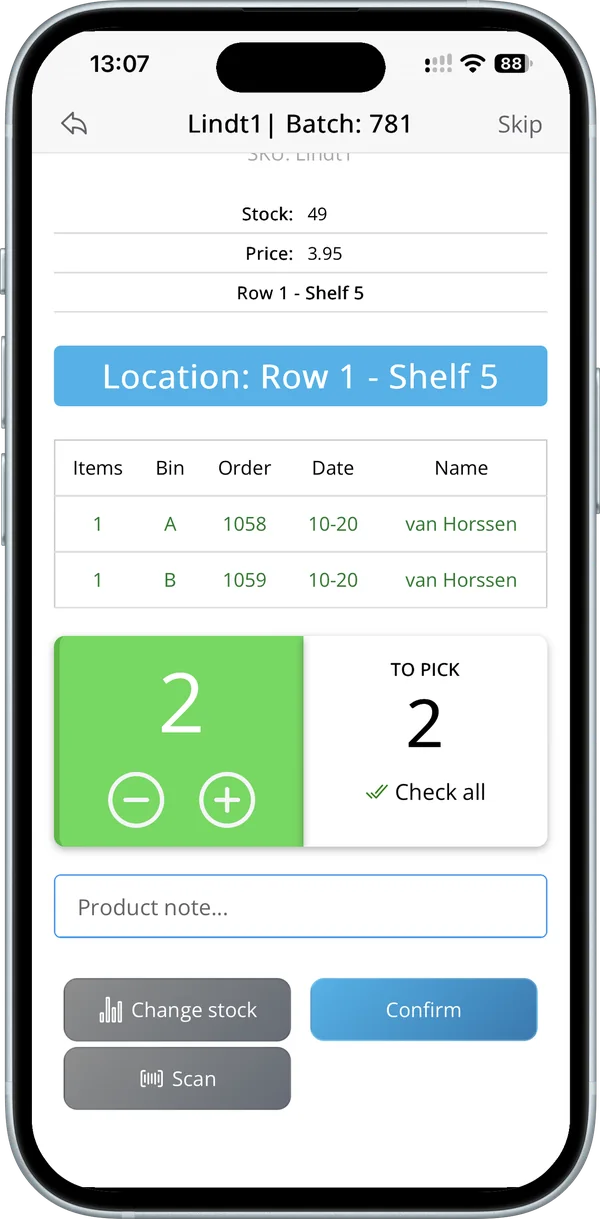
- Photo, location and quantity on screen: pickers see what the product looks like, where it is and how many to take, so new staff pick correctly too.
- Batch picking with a bin per order: when you pick several orders at once, the app shows how many go in which bin, so orders do not get mixed up.
- A second check at packing: the packer checks the contents again in the app or at a PC with Desktop Packing before the order is completed.
- Order status and history: the order status is written back to your webshop, and all orders and their history are in one overview, so customer service can answer questions straight away.
One example: horticultural supplier VLM Hydrocultuur reported that barcode scanning brought their picking errors from 5% to under 2% in the first three months. Read the VLM Hydrocultuur case.
Start with the errors that cost the most
- Count your errors for one month and note the type: wrong item, wrong quantity, missing or mixed up.
- Look at which products cause most errors. Give them a fixed location and a clear barcode.
- Switch from paper to digital pick lists with a barcode check per item.
- Add a check at packing for every order.
- Measure again after a month and compare.
Frequently asked questions
Do I need expensive scanners to check every item?
No. The camera of an iPhone or Android phone works as a scanner. A Bluetooth scanner is optional and usually costs much less than a dedicated warehouse device. See Bluetooth barcode scanners.
My products don’t all have barcodes. Can I still use the app?
Yes. Pickers can confirm quantities with plus and minus, and the product photo and location still help them pick the right item. With Finder you can create a barcode PDF for products that need one. See Finder.
How quickly can I see whether it helps?
Try it with your own orders: the trial is free for 30 days and ends on its own. Compare your error count in the trial month with the month before.
Next step: read Single order picking to see how a picking round with a barcode check works, or start your free 30-day trial.
Try it in your own warehouse
30 days free, ends on its own. Works on the phones you already have.