Integration
Pick SureCart orders faster, with fewer errors
Your SureCart orders, product photos and stock appear on your team’s phones. Pickers see the location, quantity and a photo of every item, and check it with a barcode scan.
- Connects to SureCart automatically
- Works on Android 11+ and iOS 17+
- Single and batch picking
30 days free · Ends automatically, no renewal without your approval · Barcode scanner optional
Measured at VLM Hydrocultuur: about 20 minutes faster per order and picking errors down from 5% to under 2% (first three months). Read the case
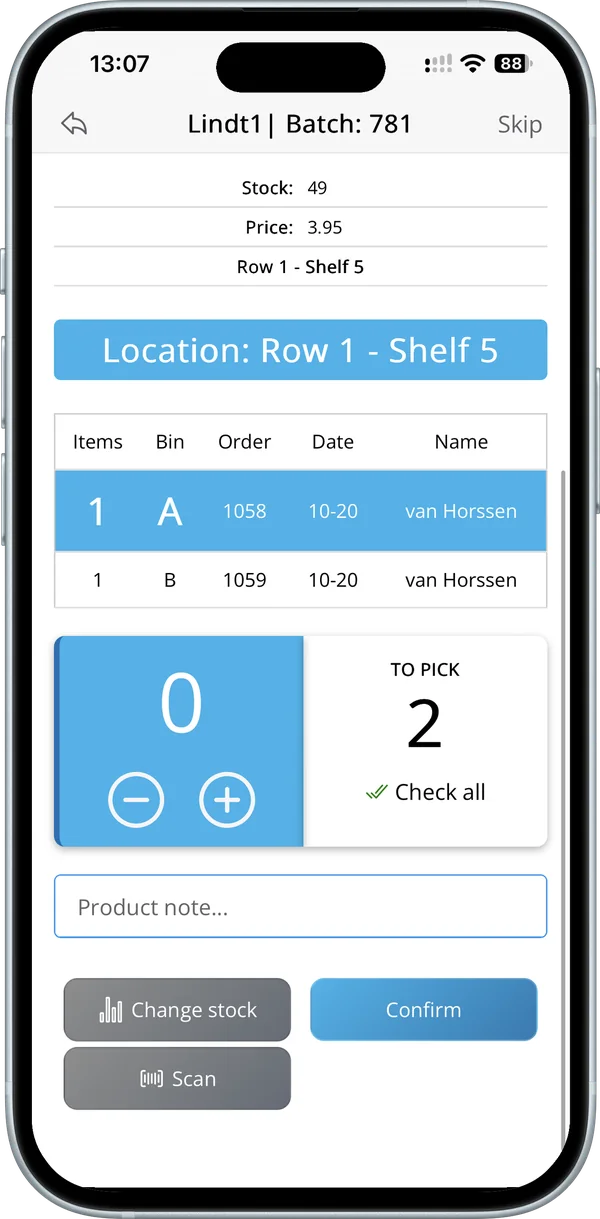
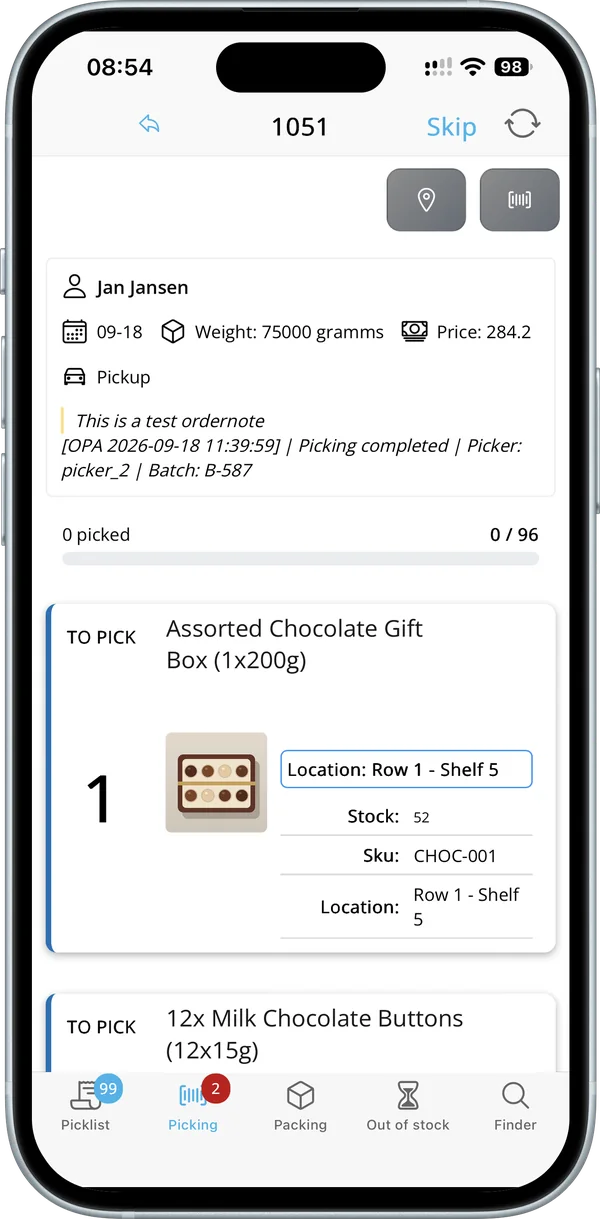
-

 Android and iOS
- Works with Bluetooth scanners
- SureCart integration
Stop picking from printed packing slips
SureCart runs your store. Order Picking App runs the stockroom: every picker knows what to grab, where to find it and how many, and customer service can see the status of every order.
Fewer wrong items
Product photos and an optional barcode check make sure the right item goes in the box.
One round, many orders
Batch picking puts 2 to 20 orders on one cart, each in its own bin.
Clear order status
All orders and their history in one overview, so customer service can answer questions straight away.
What your pickers see
Real screens from the app, from the first order to packing.
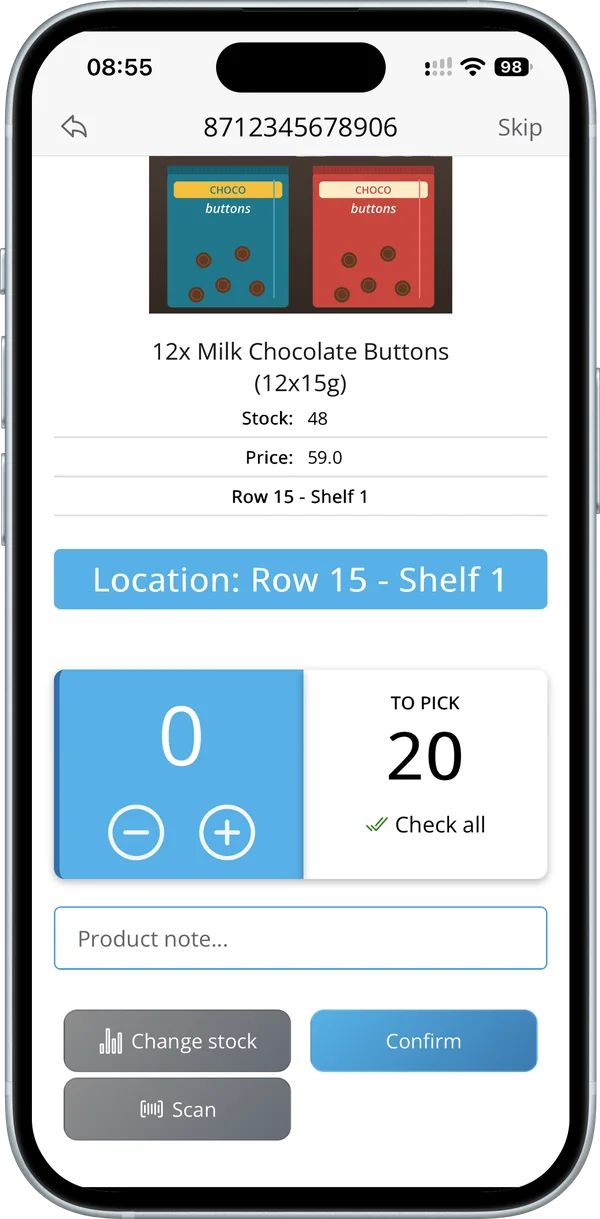 Location: Row 15 – Shelf 1
Scan and count
Where it is and how many, shown large
Scan the barcode with the camera or a Bluetooth scanner, or count with plus and minus. Stock doesn’t match? Correct it on the spot.
- Camera or Bluetooth scanner
- A note per product
- Correct stock straight away
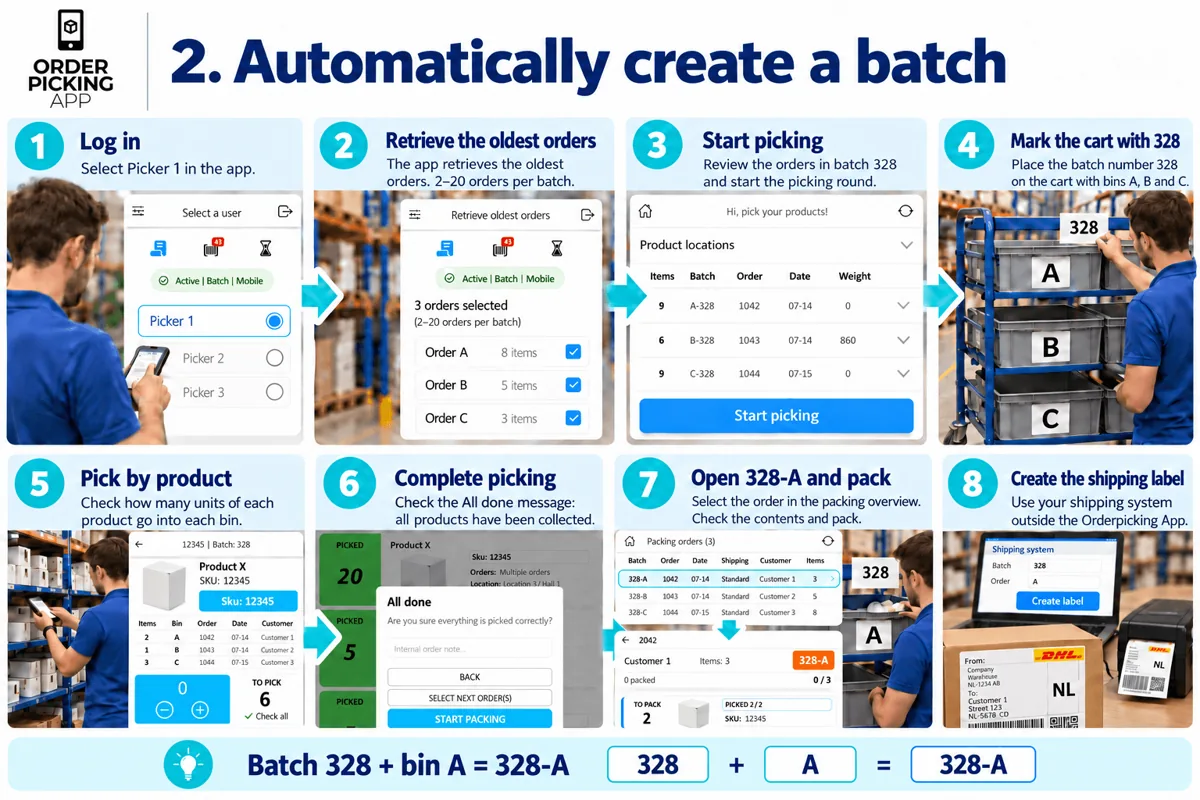 Batch 328 + bin A = 328-A
Batch picking
Several orders in one round
Pick 2 to 20 orders in one round, each in its own bin (A, B, C). The app shows per product how many go into which bin.
- One bin per order
- Four ways to build a batch
- Less walking back and forth
 Stock at a glance
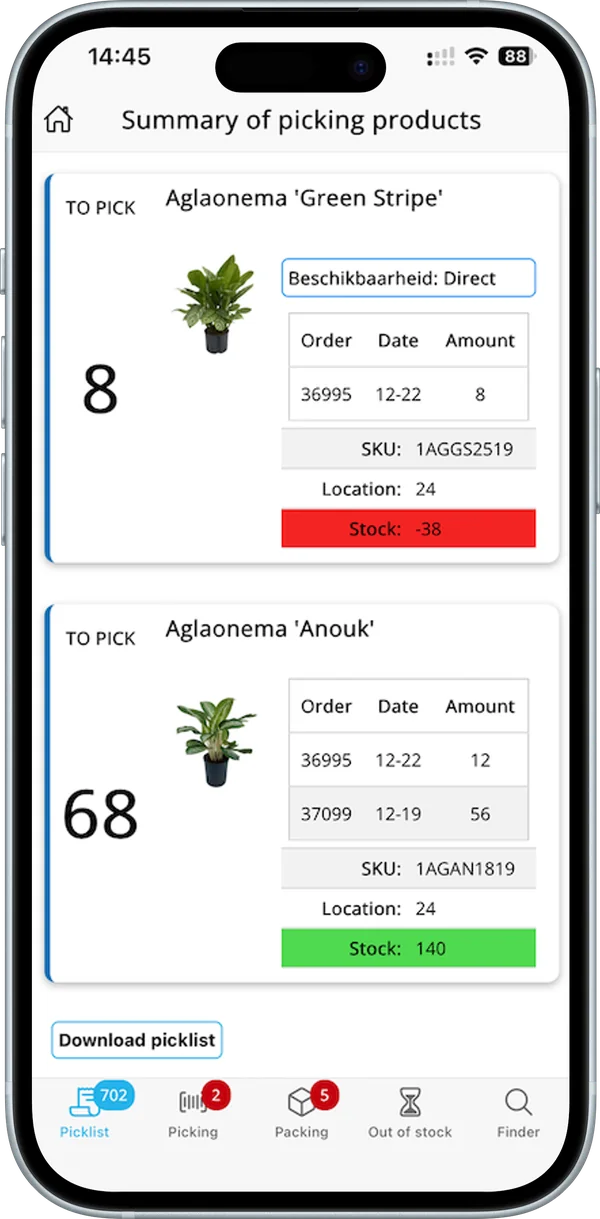
Pick summary
One list for all your open orders
The summary adds up what each product needs across your open orders, with the location next to it. When stock falls short, it turns red.
- Totals per product
- Stock shown in green or red
- Download the pick list
 Works on a PC too
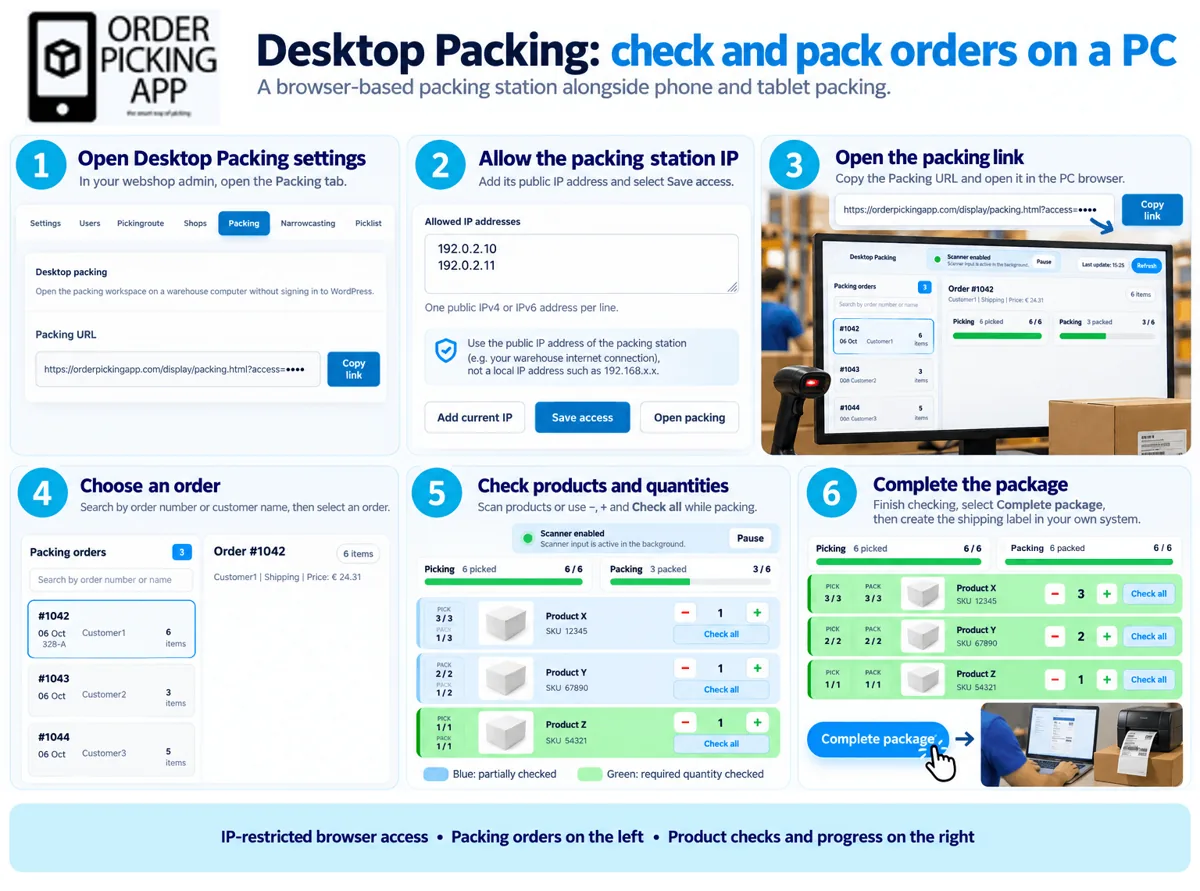
Packing at a PC
Check and pack at your desk
Desktop Packing turns any PC into a packing station. Find the order, check every product and quantity in the browser and complete the package.
- Runs in the browser
- Checks every product and quantity
- Status goes back to your store
See it in action
Short videos of single and batch picking, all under two minutes.
-
1:38
Single order picking
One order at a time: choose a picker, scan, count and pack.
-
1:47
Batch from your oldest orders
The app fills a batch with 2 to 20 of your oldest open orders.
-
1:52
Batch picking with order labels
Print a label per order, put it in a bin and scan to add the order.
Try it free for 30 days with your SureCart store
You can start today. The trial ends on its own, so you’re not tied to anything.
No extra hardware needed · Works on the phones you already have
Connected in three steps
-
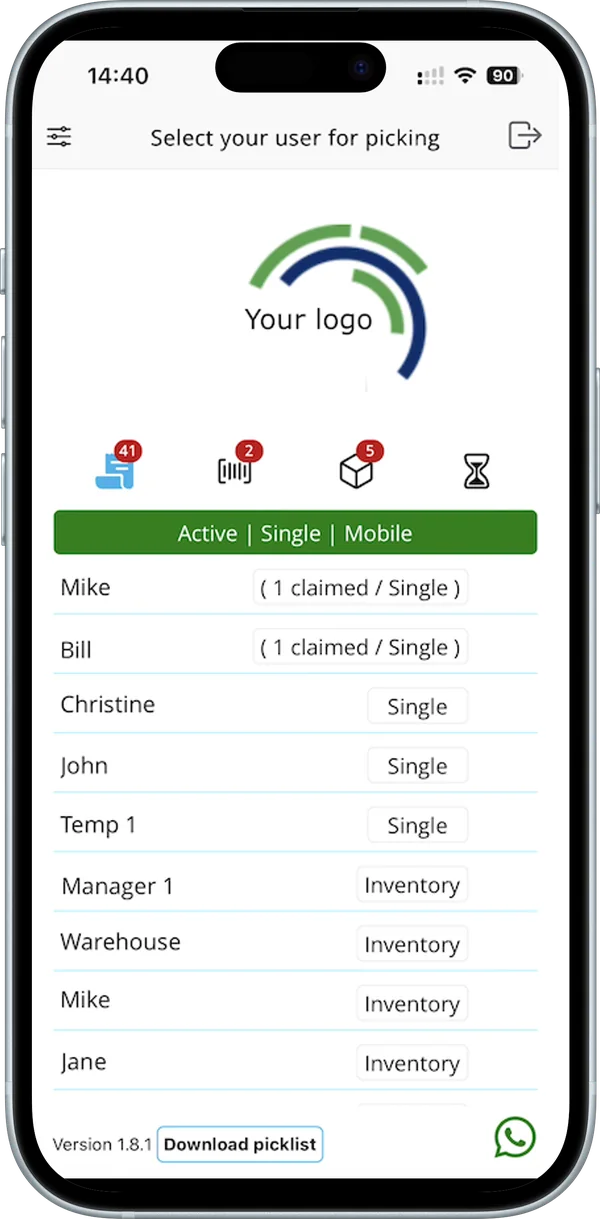
Install the plugin
With SureCart active, add the free Order Picking App for SureCart plugin from the WordPress plugin directory and activate it.
-
Connect your account
Open Order Picking App in your WordPress admin. Connect your account with your API key, or start your 30-day trial right from the plugin.
-
Scan and pick
Download the app from the App Store or Google Play and scan the API key. Your SureCart orders are ready to pick.
Order Picking App for SureCart
Install the free Order Picking App for SureCart plugin from WordPress.org, open it in your WordPress admin and connect your account with your API key, or start your trial from the plugin.
The SureCart integration at a glance
What you need, what comes in and what it costs.
Checked: October 2026 · Plans & pricing · WordPress plugin directory · App Store · Google Play
- Requirements
- WordPress 6.8 or later, PHP 7.4 or later and an active SureCart plugin.
- How you connect
- Install Order Picking App for SureCart from the WordPress plugin directory, open it in your WordPress admin and save your API key, or start a trial from the plugin.
- Your data
- Orders, line items, products, variants, customers and shipping data are read from SureCart when needed. The plugin keeps no copy of your orders and adds no database tables.
- Updates back to SureCart
- Order notes, fulfilment and catalog updates are written to SureCart.
- What is imported
- Orders and product data, including product photo and stock.
- How fast
- Instant: new orders appear in the app straight away.
- Order status back to SureCart
- Yes, the order status is written back to SureCart.
- Variants and bundles
- Variants and bundles appear as separate products on the pick list.
- Several shops or warehouses
- Each shop or warehouse is its own subscription, all in one account.
- Trial
- 30 days free on the Medium + Inventory + POS plan (up to 600 orders a month). The trial ends on its own; you get an email a few days before it does.
- Price
- From €14.95 a month (Small, up to 300 orders a month). With the Inventory or POS add-on from €54.95 a month.
- Inventory add-on (stock updates)
- Available for every platform. Ask us how it works for SureCart.
- Devices
- iPhone and iPad with iOS 17 or later, and Android phones and tablets with Android 11 or later, including Zebra scanners. A Bluetooth scanner is optional.
What stores say about Order Picking App
Orderpicking next level
Even temporary workers from foreign countries can get to work quickly and making mistakes is almost impossible.
Fantastic app for order picking
Very simple to install and setup, you can start working right away with your phone.
Good barcode scanning capability
The barcode scanning capability … has nearly eliminated picking errors, ensuring our customers receive exactly what they ordered, every time.
 K’OOK!, cooking store in the Netherlands Review on WordPress.org, March 2024
Reviews from stores on other platforms, not about the SureCart integration specifically. Each review links to where it was posted. Average from the Shopify App Store, Wix App Market, WordPress.org and BigCommerce App Marketplace, checked in October 2026.
Everything your stockroom needs
Every picking and packing feature, in one app on the phones you already have.
Your product data, right in the app
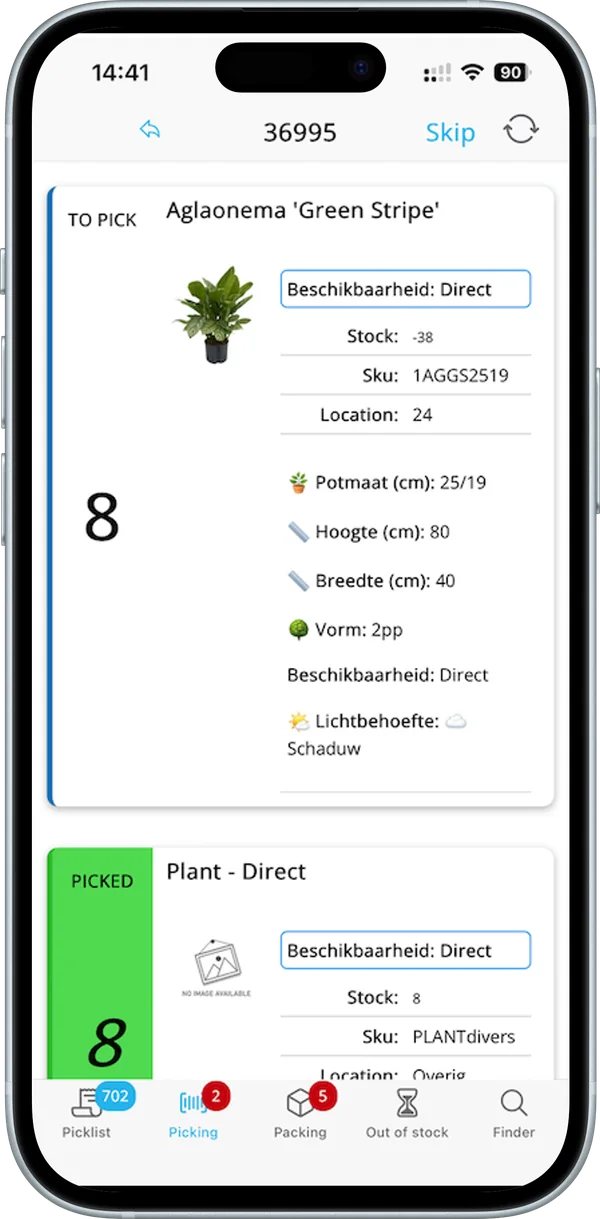
Photo, SKU, location and stock on every item.
Single and batch picking
One order at a time, or several at once into bins A, B, C on your cart.
Your own pick route
Give products a location or sort by category, so pickers walk the shortest route.
Barcode checks
Scan with the phone camera or a Bluetooth scanner.
Stock updates
Correct stock while you walk the floor.
Assign pickers
Assign orders to a picker and see who is working on what.
Order overview
All orders and their history in one place for customer service.
A plan that fits your order volume
The trial ends automatically and won’t renew without your approval. Plans are based on your number of orders.
- Ends automatically
- No extra hardware needed
- Help with installation
Frequently asked questions
Can’t find your question? We’re happy to help.
Still have a question?
Email our support team. We also help you with the installation.
How do I connect SureCart?
Install the free Order Picking App for SureCart plugin from WordPress.org, open it in your WordPress admin and connect your account with your API key, or start your trial from the plugin.
Does SureCart see that an order has been picked?
Yes, the order status is written back to SureCart. Instant: new orders appear in the app straight away.
Does the plugin copy my SureCart orders into WordPress?
No. Orders and product data are read from SureCart when the app needs them. Only settings without a SureCart equivalent are stored as standard WordPress options.
Do customers get a WordPress account when an order is created from the app?
No. The customer details are saved on the order as guest order data.
Which settings can I change in the plugin?
Picking, users, Product Collections, Packing and Narrowcasting, all from Order Picking App in your WordPress admin.
Can I pick several orders in one round?
Yes. Batch picking puts 2 to 20 orders in one round, each in its own bin. Choose from four ways: order labels, oldest orders, the picker selects, or the webshop manager assigns.
Read the guideCan we pack at a PC instead of on a phone?
Yes. Desktop Packing turns your PC into a packing station: find the order, check every product and quantity in the browser and complete it.
Read the guideWhich settings can I change after connecting?
Users and roles, your order flow, what the app shows, extra functions and tools. The guide walks through them in six steps.
Read the guideWhat happens after 30 days?
The trial ends on its own. You only start paying once you approve it.
Ready to pick faster?
Start your free trial today with your SureCart store.